
The experience
Suppliers paid on approval. Your terms, extended.
In many payables programmes the weekly file still arrives by email, in whatever shape each client's ERP produces. Someone at the funder reformats and checks it by hand, errors travel back the same way, clients phone to ask what they can still draw — and an invoice funded last month can turn up again in this week's file. That is the shape of the work in this category rather than a measured figure, and it is the work Termbridge is designed to take off the desk.
The demo runs one weekly cycle end to end. Nadia Brennan, CFO of the fictional Veltrane Industrial Group, drops in a 1,236-row export exactly as her ERP produced it. The file is parsed and checked in your browser, 14 rows come back that need a person, and one of them is an invoice the funder has already paid. Marcus Adeyemi, a reviewer at the fictional funder Kestrine Capital, approves a batch that has already passed its checks; suppliers are paid on approval, and Nadia repays 90 days after each supplier's due date. A second flow takes a new applicant from an indicative pre-approval to a person's underwriting decision, on figures with the names taken out.
This demo shows a proposed product that has not been built. No existing system stands behind it. Termbridge is a concept designed by Itexus and worked out far enough to run: the file checks, the duplicate match, the line arithmetic and the audit chain execute in your browser. Everything that would talk to a bank, a phone, an inbox, an insurer or a model is simulated, and the screen says so where it happens.
Watch a raw ERP export become a batch a funder can approve
See the controls a risk team asks about — and the edge cases — on screen
Leave with a production shape and the list of pieces to connect
Who this is for
For the people who run a payables programme, and the people who would build one.
The job, as the person it is designed for would put it: move our clients off files by email, catch what would cost us money before we fund it, see the whole book in one place — and do it without hiring more operations staff.
Heads of supply chain finance desks at non-bank funders
Specialty lenders, private credit funds with a payables programme and SCF platforms whose corporate clients still send the weekly file by email; trade-credit insurers or brokers launching a programme of their own are a second fit. Give the funder's desk real time in the demo: the batch checks, the second-person rule on new bank details, funding, and the portfolio of 27 fictional clients.
Product owners at fintech lenders and banks
You would build or buy this, and you want to know what is real, what is mocked and what production would put in its place. Every simulated part is labelled on the screen where it happens, About this demo lists what goes beyond the core concept, and Try with your own file runs the same checks on an export of yours without saving or sending it.
CFOs and treasurers at mid-market buyers
The client portal is the experience you could ask your funder for: no template to fill in, what you can still draw on the first screen, when you repay, and no supplier paid twice. Stay on the client side for the overview, the upload, the duplicate and the overview after funding; the desk takes one sentence.
This positioning is a hypothesis, not validated with buyers. No market size, share, benchmark, competitor comparison, customer count or testimonial appears on this page — and there are no references for Termbridge at all, because it is a concept and nobody uses it.
The moment that sells it
Fourteen rows needed a person. One of them had already been paid.
Row 867 of this week's file — Anvik Coatings Inc., invoice AC-20931, 27 Aug 2026, $21,650 — matches an invoice Kestrine funded 22 days earlier, in batch BAT-260914-02. Press Compare and the funded invoice opens beside the file row. Then stop talking for three seconds.
The proof is the document, not a warning
Supplier, invoice number, date and amount are paired field by field under Matches 4 of 4 fields — funded on 14 Sep 2026 in BAT-260914-02. Focus a field in the row and its pair lights up on the funded invoice, a generated document watermarked FICTIONAL — DEMO. A line in an exceptions report can be argued with; the original beside the row settles it.
One click, on the record, reversible
Drop the row and the panel reads Duplicate payment stopped · $21,650. The change log gains an entry under Nadia Brennan · 09:14 on the demo clock, the decision carries an Undo, and calling it a different invoice instead needs a reason first.
A rule over funded history, not a model
Same supplier, number, date and amount, matched against what has already been funded: deterministic, explainable, and run before anything reaches the funder. The same proof appears with reduced motion switched on.
For the funder this is money that would have gone out twice, stopped before funding. For the CFO it is the call to a supplier who was paid twice, which now never has to happen. The side-by-side comparison goes beyond the core concept — it is Proposed by Itexus, and the demo says so in About this demo.
See it before you open it
One weekly cycle, in eight screens.
Captured by the demo's own automated run at desktop width, with Guided Mode on and fictional data throughout. It opens on step 4, the invoice that was already paid; pick any other step to see its screen, or open one full size.
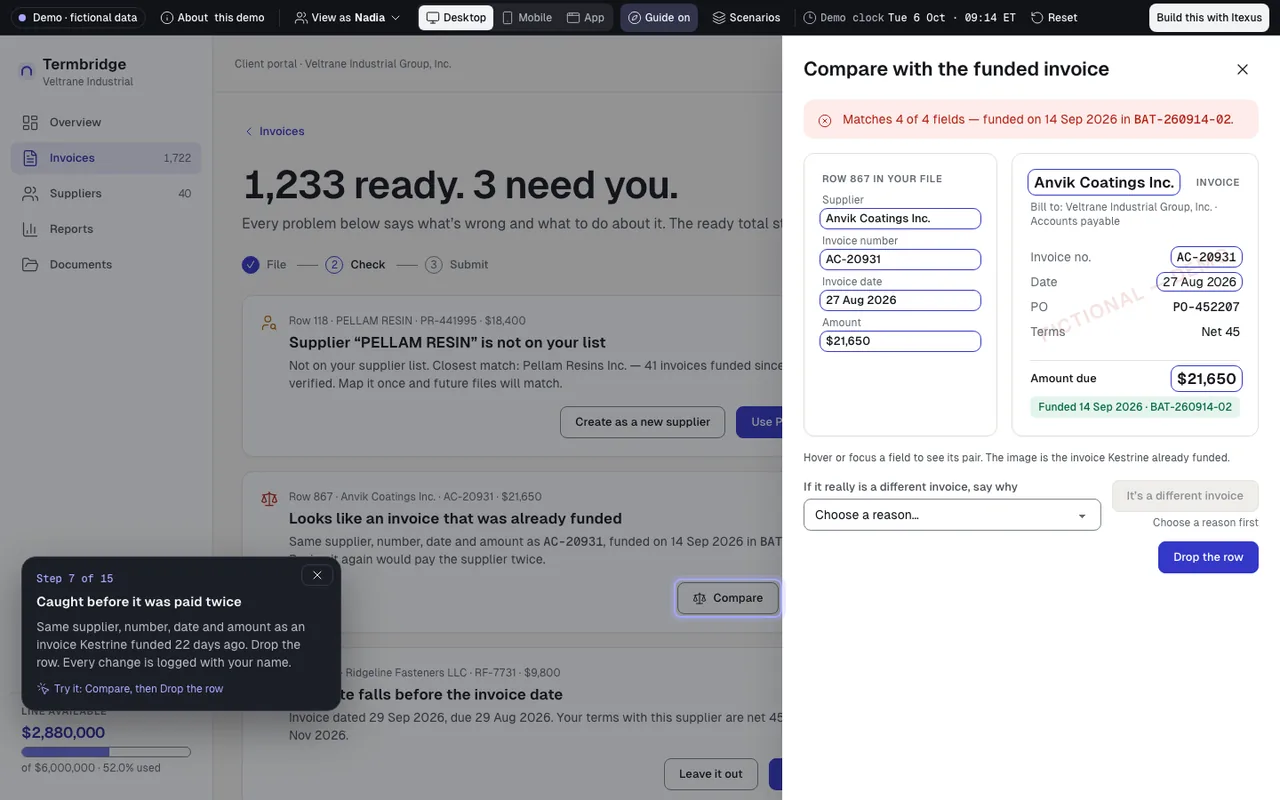
The moment: an invoice already funded, shown beside the file row before it is paid twice. The side-by-side comparison is proposed by Itexus.
Suggested walkthrough
A guided path through the strongest moments.
Five to seven minutes for the main story with Guided Mode on, about four if you skip the tips; the application flow below adds four to five. Those are estimates from the scripted story — no first-time viewer has been timed yet. Sign-in is prefilled, and Guided Mode walks the same path inside the demo in fifteen short tips.
See the facility
On the prefilled sign-in, press Continue, then Fill code in the emulated authenticator. The app version uses an emulated Face ID instead.
Facility overview for Nadia Brennan: $2,880,000 available on a $6,000,000 line, three items that need her, and payables grouped by when she repays them.Drop the export as it is
Open Invoices → Upload file → Use sample file. There is no template: this is the CSV or Excel export as the ERP produced it.
The 1,236-row file is read in a background worker in your browser: 1,222 ready, 14 need you. Eleven formatting slips — dates written day/month, a comma used as the decimal point — go in one action. Anything that changes money is decided one card at a time.Catch what was already funded
On Looks like an invoice that was already funded, press Compare, then Drop the row.
The funded invoice appears beside row 867 with all four fields matching. The chip reads Duplicate payment stopped · $21,650, and the change is logged with her name and the time.Fit the line and submit
Confirm a due date and a supplier match, accept Hold 3 for next cycle — the invoices due latest — then Review and submit → Submit.
1,232 ready. Nothing needs you. The line left after the batch, $7,150, is on screen before she commits, and the hold is a proposal she accepts rather than an automatic cut.Approve, fund, see it land
Press See it at Kestrine’s desk, sign in as the reviewer, open the batch, then Approve batch → Generate payment file → Record funding. Finish with View as → Nadia.
The reviewer sees the checks: the line, the insurance cover, duplicates, new suppliers' bank details verified by a second person, and sanctions handled at the bank. The payment file and the bank's confirmation are marked simulated. Back on Nadia's overview, the batch has moved to repayment 90 days after each supplier's due date.The second flow
From a new applicant to an underwriter's decision, with the names kept away from the model.
A funder that moves clients off email still has to onboard new ones. Open this flow from the end card with Explore the application flow, or with View as → Elena Marsh. It adds four to five minutes, and it is where credit and risk people usually lean in.
Apply in one session, with no password
Elena Marsh, CFO of the fictional Ferrow Bay Specialty Coatings, confirms her email and phone, signs a mutual NDA and adds three years of sample statements.
There is no password to create. Email, SMS, the e-signature and the document reading are simulated; the forms and the figures check run in your browser.Confirm the figure the scan could not read
Document reading returns a prepared scan of the statements with one figure it could not read.
She types that figure in. The OCR is simulated; the figures check that follows runs in your browser.See what reaches the model
Before any automated analysis, names, addresses and account numbers are replaced with placeholders. The screen puts what she submitted beside what the model receives.
Figures and dates unchanged, names replaced. If a name were still there, a check would stop the analysis before the model — the Scenarios panel shows exactly that.An indicative answer, not an offer
The answer is labelled Indicative — not an offer of credit, with a pro forma of what a facility would do to her working capital. Credit thresholds are never shown to the applicant.
Five checks are clear and one needs a person, so the application goes to an underwriter instead of being declined.A person decides, on the record
On the funder's side, open the borderline application. The credit-box result sits beside a memo labelled Simulated AI draft, and every statement in it links to its source page.
The applicant's identity is revealed only after a reason is logged, and the decision is stamped with the version of the credit policy it was made under.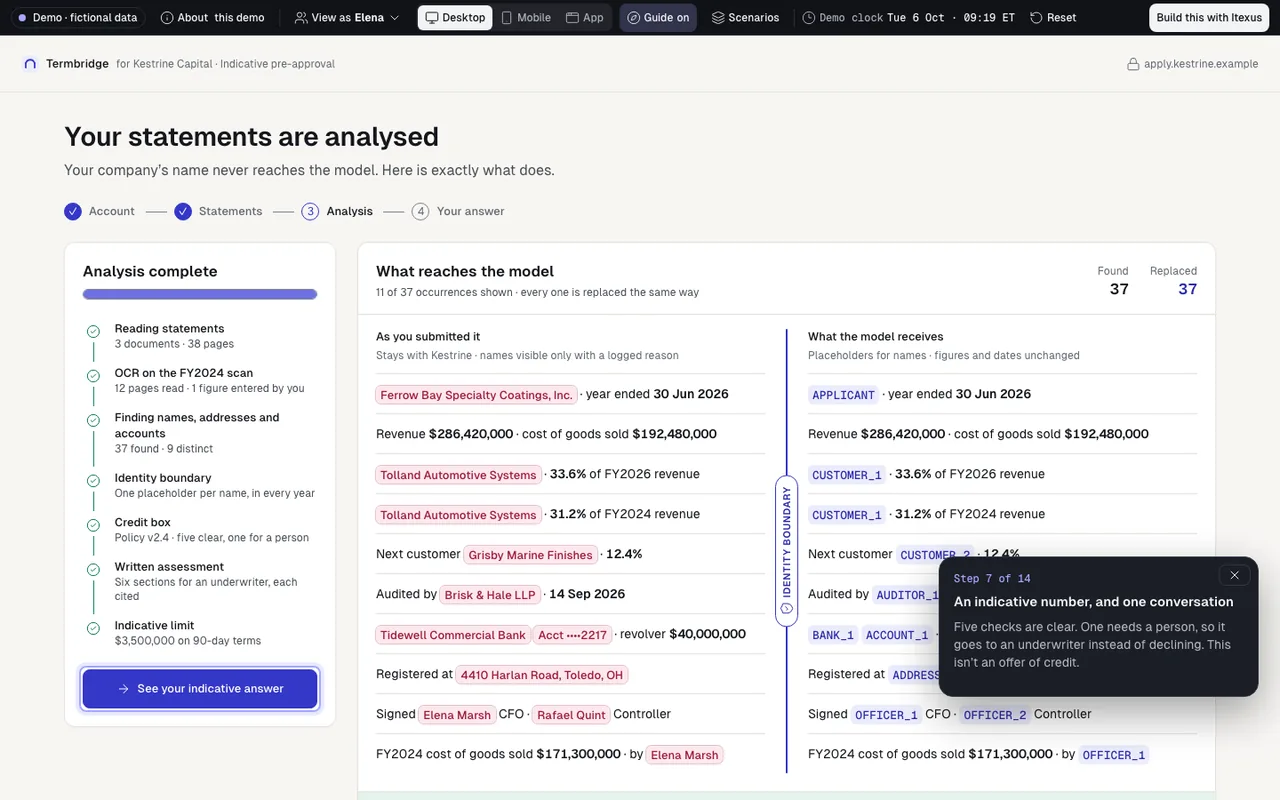
In the demo the names in the sample statements are labelled in advance; the check that none of them reaches the model side is a real string check on that document set. De-identification accuracy on real documents has not been measured and is not claimed. Automated tests open every screen of this flow but do not yet drive its clicks, the identity reveal or the decision; those were seen working in a scripted walkthrough of a local build.
Beyond the happy path
Scenarios: the situations the walkthrough does not reach.
The demo carries a Scenarios control in its top bar. It is a demo instrument rather than part of the product: each entry loads a different starting state — an edge case, a failure, a rule firing — and the screens recompute from it. The guided path shows the product working. The scenarios show what it does when the situation is not the ideal one.
One button, at any point in the demo.
Pick a scenario and the demo re-seeds itself and opens on the screen where that situation shows. Nothing has to be set up beforehand, and you can go back to the guided path whenever you want.
The states a product actually lives in
A limit that is used up, a figure that has gone stale, an approval that comes back as a question. These are the cases that decide whether a product survives contact with real users — and here each one is a state you can open, not a sentence you have to take on trust.
A rule you can trigger, then watch
A scenario sets up one condition and lets the system react to it. What appears on screen is computed by the same logic that runs the happy path, so the numbers, the blocks and the explanations behave as they do in the rest of the demo.
Your “what happens when…”, on the spot
The questions that decide a project are usually failure questions. If yours has a scenario, play it during the walkthrough and judge the answer on screen instead of waiting for a follow-up e-mail.
10 cases in this demo's panel
Termbridge's panel holds ten edge cases of supply chain finance. Each card says where the case starts, what will change on screen and how to get back, and each case has its own automated test. Four of them start before the weekly file is loaded: once the main story has run, their buttons say so, and Reset makes them available again.
- 01Proposed by Itexus
Day one: a brand-new facility
Every empty screen says what to do next: the whole line available, one task — Upload your first payables file — and Nothing drawn yet.
- 02Core concept
A year-end file of about 15,000 invoices
The same checks on a much bigger file, and one action fixes all 121 formatting slips of one kind.
- 03Proposed by Itexus
The connection drops mid-upload
The upload resumes, and the rows already received are not sent again. The drop is scripted; the demo itself uses no network.
- 04Proposed by Itexus
Two people, one batch
A colleague's changes are shown, with who made them, before anyone submits.
- 05Completed by Itexus
The insurer's cover lapses
Funding stops by itself — Funding is paused while your facility renews — and restarts the moment the renewal is recorded.
- 06Core concept
The same screen, another seat
A Viewer can export but not submit; a Reviewer can propose a credit-policy change that only an Admin saves. Every refusal says why.
- 07Completed by Itexus
The insurer cuts cover
The line follows the same minute, because it is the lower of the limit and the cover: on the fictional facility, available to draw falls from $2,880,000 to $1,380,000. Restoring cover brings it back.
- 08Core concept
A name slips past redaction
The check finds it and stops the analysis before anything reaches the model: Stopped before analysis.
- 09Proposed by Itexus
Mixed currencies and a lookalike supplier
Invoices in other currencies are flagged and converted to dollars for the line, and a supplier name one letter away from a known supplier is flagged as a lookalike — the classic fraud pattern.
- 10Core concept
Three applicants
The same answer screen for a clean pass, a borderline case that goes to a person, and a decline.
Core concept marks a case that belongs to the concept itself; Proposed by Itexus and Completed by Itexus mark what goes beyond it. All ten are proposals for a product that has not been built.
Scenarios are a demo control and never appear inside the product itself. Every state they load is built from the same fictional data, and Reset returns the demo to its clean starting seed.
Why this is not a mockup
The checks run. They are not drawn.
A concept is easy to fake with screenshots. These parts of Termbridge execute in your browser, on fictional data, and each of them can be poked at during a call.
A real parse of a 1,236-row export
The sample file is read in a background worker the way a CSV or Excel export of your own would be: rows checked, supplier names matched to the client's supplier list, new suppliers listed before they are created. Try with your own file runs the same code on an export of yours, in memory only.
Line arithmetic you can check by hand
Available to draw is the lower of the limit and the insurance cover, minus what is drawn and reserved: $2,880,000 on a $6,000,000 line. A $2,872,850 batch leaves $7,150, and that figure is on screen before anything is submitted.
An audit chain the browser re-checks
Every action is written to an append-only trail, and each event carries a SHA-256 hash of the one before it. Verify chain recomputes every hash in your browser. In production the chain could also be anchored outside the database.
Capability map
Clear about what you're experiencing.
Works in this demo
Runs in your browser on fictional data, in all three versions of the demo.
- Reading a CSV or Excel payables file in a background worker: row checks, and one-action fixes for formatting slips of the same kind
- Duplicate detection against funded invoices, with the funded invoice shown beside the file row
- Supplier matching, and new suppliers created from the file
- The line arithmetic — the lower of the limit and the insurance cover, minus what is drawn and reserved — and the proposal to hold the invoices due latest
- Second-person verification of new suppliers' bank details before funding
- The reviewer's queue and batch approval, with rejecting rows by reason code and requesting information on the same screen
- The facility ledger that updates the buyer's overview after funding, and the funder's portfolio of every client's limit, drawn amount and utilisation
- The application: forms, the NDA step, the figures check, credit-box rules held as versioned data, and a pro forma
- Revealing an applicant's identity only with a logged reason, and decisions stamped with the policy version
- An append-only audit trail with a SHA-256 hash chain, verified in the browser
- Try with your own file: the same checks on an export of yours, in memory only
- Three versions, Guided Mode, a demo clock, View as and Reset
- Ten edge cases from the Scenarios panel
Simulated here
Behaves like the real thing and reaches nothing. No money moves and no message is sent.
- The sign-in second factor — codes and push approvals appear inside the demo; nothing is sent to a phone
- Email and SMS — drawn as messages inside the demo; nothing is sent
- E-signature of the mutual NDA
- Document reading (OCR) — a prepared scan with one unreadable figure for the applicant to type in
- Finding names in documents — entities in the sample statements are labelled in advance; the check that no name reaches the model side is a real string check on this document set
- The AI-drafted memo — pre-written text with slots, labelled Simulated AI draft
- The payment file and the bank — a watermarked preview and a scripted confirmation; no money moves
- Sanctions screening — shown as happening at the bank; the demo makes no screening decision
- The insurer — a cover record on the facility; no insurer is contacted
Possible integrations
Candidates for a production build. Nothing here is connected, no vendor is chosen, and none of it is a readiness statement.
- A managed identity provider with multi-factor sign-in, over OIDC
- The funder's bank: a payment file in the bank's format, and the bank's confirmation
- An e-signature provider, and email and SMS delivery
- OCR, run in the funder's own cloud account or self-hosted
- Entity recognition for de-identification, accepted against the funder's own test set
- A language model with zero data retention for memo drafts, each statement linked to its source
- Sanctions screening, at the bank or in the platform
- Credit-insurance cover records
- API, SFTP or ERP channels for payables files — not in the demo
Completed and proposed
Everything here is a proposal. Some of it goes further.
Termbridge has not been built, so nothing on this page describes a product in use. Within the concept, a few elements go beyond its core. The demo marks them on the screen where they appear and lists them in About this demo; they are listed here the same way.
The side-by-side check of a suspected duplicate against the funded invoice
Proposed by ItexusThe moment the demo is built around. Showing the funded invoice beside the file row, with the matching fields paired, goes beyond the core concept.
Fixing formatting slips of one kind in a single action
Proposed by ItexusDates written day/month, a comma used as the decimal point: same kind of slip, one click. Anything that changes money is still decided one card at a time.
What reaches the model: the applicant's figures with and without names, side by side
Proposed by ItexusThe view that lets an applicant see exactly what the model receives. The check that stops the analysis when a name slips through belongs to the core concept.
Four scenarios: day one of a new facility, a dropped connection that resumes, two people on one batch, mixed currencies and a lookalike supplier
Proposed by ItexusEach card in the Scenarios panel carries the label, so the distinction holds when the demo is shown on a call.
Two scenarios about insurance cover: it lapses, and the insurer cuts it
Completed by ItexusWorked out further by Itexus. The rule that pauses or shrinks funding is the same one the main story runs on; no insurer is contacted.
Guided Mode, the three versions, the demo clock, View as, Reset and the end card
Demo shellScaffolding for showing the concept, not part of it.
Features marked “Proposed by Itexus” go beyond the core concept. Like everything in this demo, they are not features of an existing product.
However you open it
Three display versions of the same demo.
One demo, three versions, switchable from the demo bar at any point without losing progress. The default is chosen by screen size, and progress survives a page reload as well.
Web · desktop
The client portal and the funder desk as full workspaces: a sidebar, the check screen with its running total and change log, and the side sheet for the duplicate comparison. The version for a laptop on a call.
Web · mobile
The same flows at phone width. On the check screen the total, what still needs you and Review and submit stay pinned to the bottom of the screen.
App emulation
A phone frame on a larger screen and full-bleed on a real phone, with sheets and an emulated Face ID in place of the code. It is a web emulation of a mobile app, not a native binary.
Narration built in
Guided Mode
On by default. Each step of the story gets a short tip: what the screen is, what to do (Try it: …) and where you are (Step 7 of 15). Wander off and it says so, with Back to the guided path. The tip sits on the demo's own layer and never covers the app's main action — beside the phone in the app version — and Esc closes it. The whole story works with it switched off.
From demo to production
What each simulated part is standing in for.
The demo is a static web app over a bundled synthetic seed: no backend, and the session lives in the viewer's browser. Here is what each part stands in for. Nothing in the right-hand column is built, and none of it is a readiness statement.
A production build could be a modular monolith: three web apps — client portal, funder desk, public pre-approval — and a separate intake API, on Postgres with row-level security per client, with a restricted zone for original documents and identities and a de-identified zone for the rules, the model and the memo. The trade-off is named: a monolith scales less independently than microservices, and in return it is much simpler to run for a funder with a small engineering team. On regulation, labels rather than claims: SOC 2 Type II audit readiness, GDPR / UK GDPR and sanctions requirements are potentially applicable; US fair-lending and state disclosure rules and the EU AI Act have not been evaluated. No audit has been performed, and nothing is claimed compliant.
Built to adapt
Four answers a funder's risk team will ask for, on screen.
What Itexus offers here is building it. The demo is the specification you would start from: the line between what runs and what is simulated is drawn on every screen, and production's answer for each simulated part is on this page.
The file as it comes out of the ERP
No template. The demo reads a 1,236-row export in the browser and leaves the person 14 rows that need a decision, 11 of them fixed in one action.
The duplicate, proven by the document
An invoice that was already funded is caught and shown beside the funded original. One click drops it, and it is on the record. This one is proposed by Itexus.
The controls a risk team asks about — and the next question too
A second person verifies new bank details. The line and the insurance cover are checked before funding, sanctions are shown where they actually happen, and the audit chain is append-only. Then, one click away in Scenarios, the insurer cuts cover and the line follows the same minute, and a lookalike supplier is flagged before anyone pays it.
Figures without names, and a person decides
The applicant sees exactly what reaches the model. If a name slips through, the analysis stops before the model. Every credit decision is made by a person, with the reasons on screen.
Discuss with Itexus
Decisions to shape for your product
- How do your clients send payables files today, and what goes wrong with them most often?
- Who verifies a new supplier's bank details now? Could the same person also approve the batch?
- When a batch goes over the line, who decides what waits: the client, your team, or a rule?
- Where does sanctions screening happen in your flow: at your bank, or with you?
- Is credit-insurance cover part of your programme? What happens today when the insurer cuts it, or it lapses?
- Have you ever been asked to pay a supplier whose name was almost right?
- Would you let a model read applicants' statements if the names stayed on your side? What would your credit policy need before it could be written as rules?
- What does your bank need to receive, and in what format, to pay suppliers on approval?
Demo access
Everything you need to start.
Nothing is required to start: the sign-in fields are prefilled with fictional values and the second factor is emulated inside the demo. They are listed so you know who you are looking at, and so you can retype them after a Reset. Switch people with View as in the demo bar. The applicant, Elena Marsh, has no password at all — her email and phone are confirmed through emulated messages.
Client Admin — the buyer's CFO
Nadia Brennan, Veltrane Industrial Group — fictional, on a reserved example domain. The second factor is Fill code in the emulated authenticator; in the app version, an emulated Face ID.
nadia.brennan@veltrane.exampledemo-password-2026Reviewer at the funder
Marcus Adeyemi, Kestrine Capital — fictional. Approve the emulated push; in the app version, an emulated Face ID.
marcus.adeyemi@kestrine.exampledemo-password-2026Before you begin
Demo boundaries and data policy.
Known limitations
- Termbridge is a concept: no product has been built, and nothing runs anywhere except this demo.
- No money moves, no message is sent and no outside service is called.
- Nothing in this demo is an offer of credit. Credit thresholds and pricing shown are illustrative.
- De-identification accuracy has not been measured and is not claimed.
- Not shown: API, SFTP and ERP channels; multi-tenant administration; the funder's own branding; reconciliation between bank and platform; overdue repayments and insurance claims.
- One facility for the hero client, with amounts in US dollars.
- Try with your own file really checks your file, but against a fictional facility and supplier list, so some rows will land as unknown suppliers. Submitting and exporting are switched off there.
- Automated tests open every screen of the application and underwriting flow but do not yet drive its clicks, the identity reveal, the decision or Verify chain. The second-person rule and Try with your own file have no automated test. All of these were seen working in a scripted walkthrough of a local build on 29 September 2026.
- Timings are estimates from the scripted story; no first-time viewer has been timed.
- The scenarios are scripted starting points: each one puts the demo into a state, and Reset brings it back. Exchange rates in the currency case are illustrative, and merging two people's edits in real time is not shown.
- Accessibility was checked by automation only: axe-core with WCAG 2.1 A and AA rules found no serious or critical issues on all 34 screens in five layouts. That is not an audit, not a conformance statement, and no manual screen-reader pass has been done.
- Tested in Chromium and WebKit. Firefox was not tested.
- English only.
Data and safety
- The data in this demo is fictional and generated. Every company, person, invoice, document and figure is invented: domains use .example, phone numbers use 555-01xx, and document images carry a FICTIONAL — DEMO watermark.
- Nothing this demo sends reaches anyone. It has no backend, no analytics and no cookies, and its content-security policy allows its own origin only; on the deployed address, the main story made no request outside that origin.
- One IndexedDB store in your own browser holds the session and a log of actions. It is kept for 7 days by design, and Reset clears it.
- “Try with your own file” is the one place built for a real payables export: the file is read in your browser, is not saved or sent, and bank-detail-like values are masked on screen. Use only a file your policy allows you to open in a browser tool.
- The demo itself is marked noindex, nofollow, and its robots.txt disallows everything.
- Do not enter real personal, payment or document data.
Disclaimers
- Concept product designed by Itexus — not a live system
- The data in this demo is fictional and generated.
- No action taken in this demo is performed in any production system.
- Do not enter real personal, payment or document data.
- Simulated sign-in, email, SMS, e-signature, document reading (OCR), AI, payment and bank providers are not connected to production.
- Features marked “Proposed by Itexus” go beyond the core concept. Like everything in this demo, they are not features of an existing product.
- This demo shows a proposed product that has not been built. No existing system stands behind it.
- Nothing in this demo is an offer of credit. Credit thresholds and pricing shown are illustrative.
Provenance
- What it is
- A concept product designed by Itexus. There is no product and no product source code behind the demo; the demo is the specification a build would start from.
- Positioning
- A hypothesis, not validated with buyers. No market size, share, benchmark, competitor comparison, customer count, testimonial, savings or processing-time figure appears on this page, because none has been measured.
- Conformance
- No audit or assessment against any standard was performed. Regulatory regimes are labelled potentially applicable or not evaluated, never claimed, and the accessibility result is an automated sample.
- Verification
- 32 of 32 automated runtime tests pass in Chromium and WebKit against the demo's release build: the main story in all three versions, with the guide off and with reduced motion, 34 screens in five layouts, keyboard, 200% zoom, Guided Mode placement, load performance, and one test per scenario. The deployed address serves the byte-identical entry script, and the main story was re-run there on 29 September 2026: 3 of 3 pass, with no console error and no request outside the demo's origin.
- Content version
- 1.0.0, written on 29 September 2026 from the demo's own claims register; runtime 1.0.0, seed 1.0.0. The demo clock is fixed at Tue 6 Oct 2026, 09:12 ET, so the dates on screen stay consistent with each other.